How to Check Annual Filing Status of a Company or LLP on MCA V3
The MCA V3 portal provides a free public tool to check the annual filing status of any registered Company or LLP in India — without login or any fee. This is useful when:
- Verifying compliance status of a company before a business transaction or due diligence
- Checking whether your own company’s filings are reflecting correctly on MCA
- Confirming filing before a Director attempts to sign forms for another company (to avoid defaulter-related errors)
- Downloading MCA acknowledgements for filed forms
Steps to Check Annual Filing Status on MCA V3
Go to MCA Website
Navigate to MCA Services → FO Services → Check Annual Filing Status
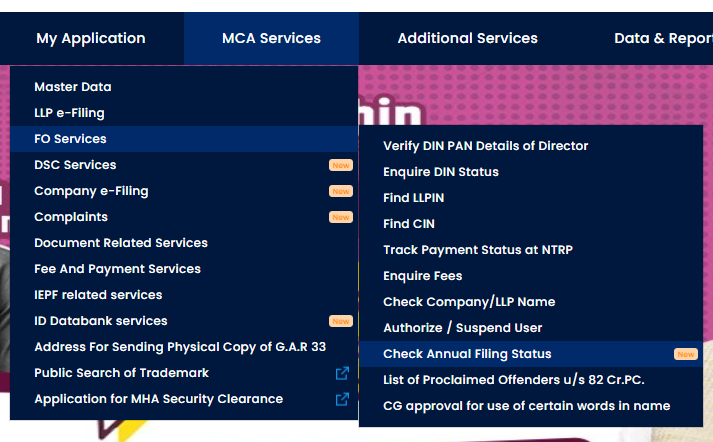
Enter the Company Name / LLP Name / CIN / LLPIN in the search field.
Enter the Captcha and submit.
The results screen will show a list of all SRNs with form names and dates of filing for that Company or LLP.
You can also download the MCA Acknowledgement for any filed form directly from this list.
What the Results Tell You
| What you see | What it means |
|---|---|
| Form listed with SRN and date | Form has been successfully filed and accepted |
| Form missing from the list | Either not filed yet, or filing is pending processing |
| No results at all | Company/LLP has not filed any annual forms on MCA |
Note: This tool shows all annual filing forms across both MCA V2 and V3, including ADT-1. It gives a complete filing history for the Company or LLP.
Frequently Asked Questions
Is login required to check annual filing status? No. This is a free public service and does not require an MCA login or any fee.
The filing is showing on MCA but the status tool is not showing it — why? The tool covers all annual filing forms including older V2 filings and ADT-1. If a form is not appearing, it is likely still being processed by MCA or there may be a portal delay. Try checking again after some time.
Can I check filing status for an LLP as well? Yes. Enter the LLP Name or LLPIN in the search field. The tool works for both Companies and LLPs.
I need to download the actual filed documents, not just the status — how? The acknowledgement can be downloaded from this tool. For the actual filed forms and attachments (balance sheets, annual returns), use View Public Documents (₹100 fee applies).